In short
Next.js 16 replaces implicit caching with opt-in Cache Components, so one page can be a static shell with dynamic parts streamed in. That model, plus routing, server rendering and server actions, is the reason to pick Next.js over a client-only React app. If your app sits behind a login and SEO doesn't matter, plain React is still a fine choice.
Next.js 16 came out in October 2025, and the 16.x releases since then have changed how you build an App Router app more than most majors did. Caching is now opt-in, the static/dynamic split happens per component instead of per page, and Turbopack is the default bundler. This article covers what's new in Next.js 16 (current as of 16.4, 5 November 2026), then answers the question we hear most from clients: why use Next.js at all instead of plain React?
The problem Next.js 16 fixes
Before 16, the App Router cached things you hadn't asked it to cache, and one call to cookies() could turn a whole page dynamic. Teams ended up with pages that were either fast and stale or fresh and slow, and it was hard to tell which from the code.
Next.js 16 makes caching something you write down. Code runs at request time unless you mark it with 'use cache'.
What's new in Next.js 16
Cache Components: a static shell plus streamed dynamic parts
Turn it on with cacheComponents: true. It replaces the old experimental.ppr and experimental.dynamicIO flags, which were removed in 16. Here is how a page renders under the new model:
- Static markup (headings, layout, nav) is prerendered at build time into a static shell.
- Components marked
'use cache'are cached too and go into the same shell.cacheLifesets how long they stay fresh, andcacheTagnames them so you can invalidate them later. - Components that read request data (
cookies(),headers(), uncached fetches) must sit inside<Suspense>. The fallback goes into the shell, and the real content streams into the same response at request time.
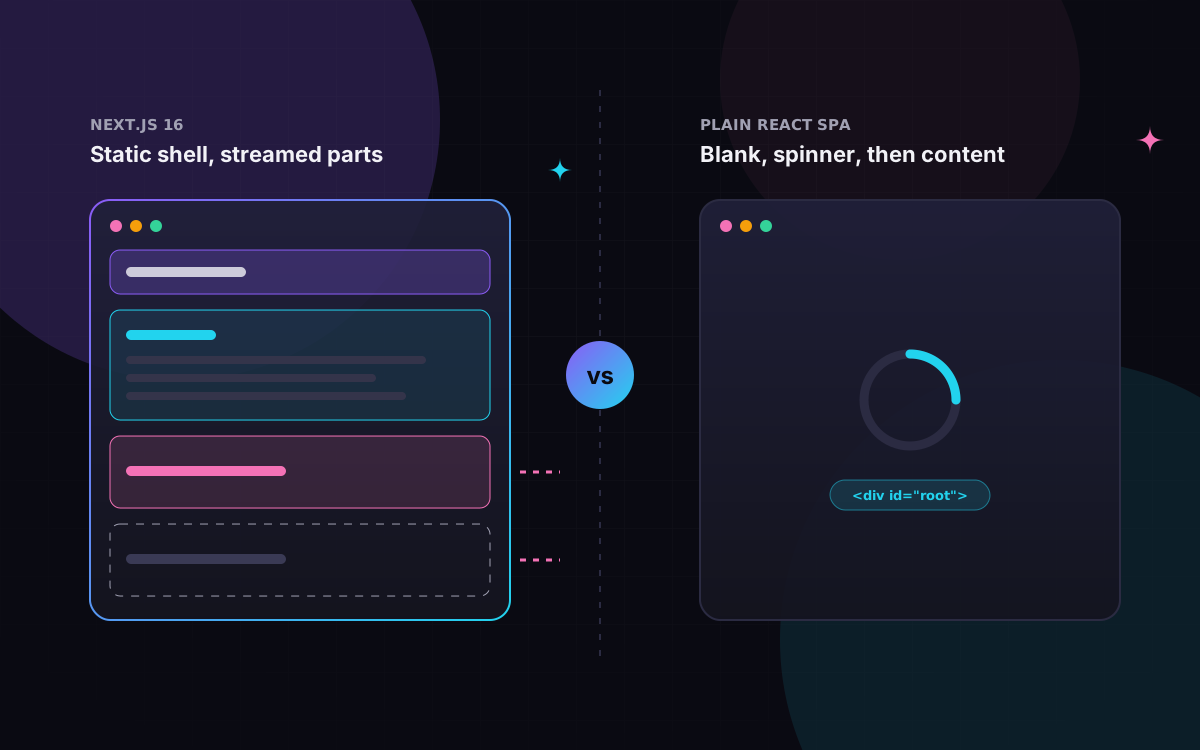
So the browser paints the shell straight away and the dynamic parts fill in one by one.
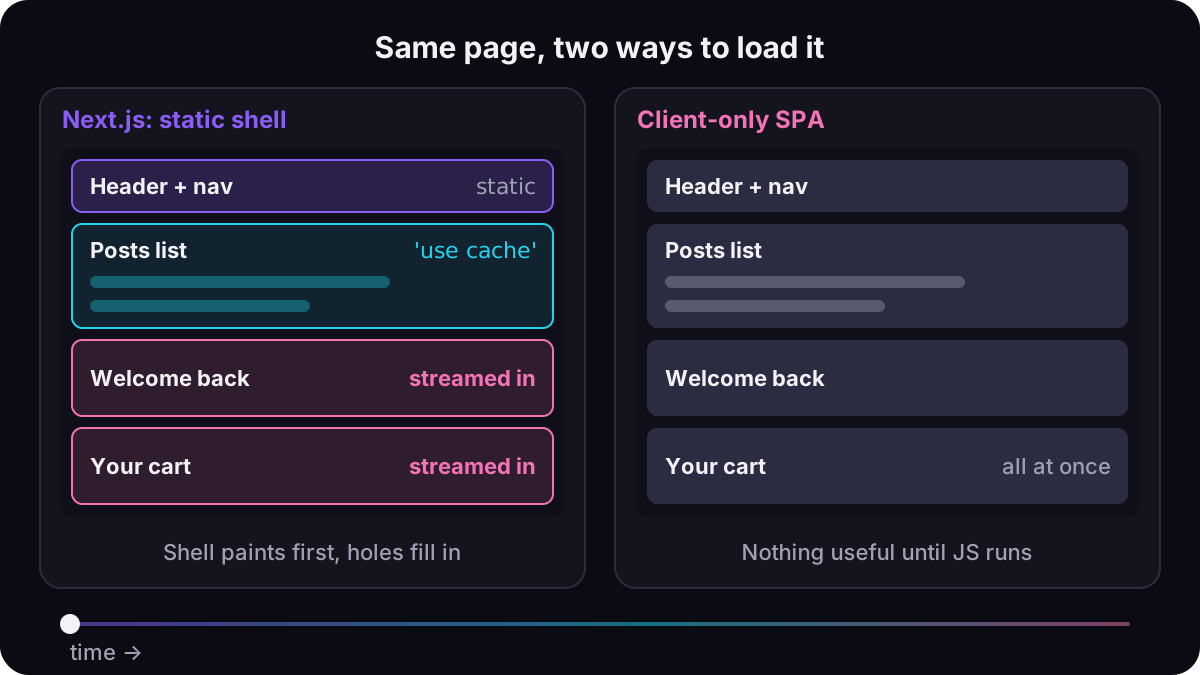
The static shell is visible from the first paint, while the client-only app shows nothing useful until its JavaScript has downloaded and fetched data.
// next.config.ts
import type { NextConfig } from "next";

const nextConfig: NextConfig = {
  cacheComponents: true, // 'use cache', cacheLife, static shell + streaming
  partialPrefetching: true, // 16.3+: prefetch the static parts of each route
  reactCompiler: true, // stable since 16.0, off by default
};

export default nextConfig;
// app/blog/page.tsx
import { Suspense } from "react";
import { cookies } from "next/headers";
import { cacheLife, cacheTag } from "next/cache";

type Post = { id: string; title: string };

export default function BlogPage() {
  return (
    <>
      {/* Static: part of the prerendered shell */}
      <h1>Our blog</h1>

      {/* Cached: also baked into the shell, refreshed on its own schedule */}
      <Posts />

      {/* Request-time: the fallback ships in the shell, the content streams in */}
      <Suspense fallback={<p>Loading your settings…</p>}>
        <Greeting />
      </Suspense>
    </>
  );
}

async function Posts() {
  "use cache";
  cacheLife("hours");
  cacheTag("posts");

  const res = await fetch("https://api.example.com/posts");
  const posts: Post[] = await res.json();
  return (
    <ul>
      {posts.map((p) => (
        <li key={p.id}>{p.title}</li>
      ))}
    </ul>
  );
}

async function Greeting() {
  const name = (await cookies()).get("name")?.value ?? "there";
  return <p>Welcome back, {name}.</p>;
}
Reading cookies() here no longer makes the whole route dynamic. Only the part inside <Suspense> waits. This site runs on the same model: our content loaders use 'use cache' with cacheLife('max'), because content only changes when we deploy.
The 16.x releases have built on this. 16.3 added Partial Prefetching (partialPrefetching: true) and Instant Navigations tooling. In 16.4 the team recommends Cache Components for every app, turns it on by default in create-next-app, and says it will be the default in Next.js 17. 16.4 also added ensureStatic, a route export that fails the build if dynamic content sneaks into a page you meant to keep static.
New cache invalidation APIs
All three are imported from next/cache and called from Server Actions:
// app/actions.ts
"use server";

import { refresh, revalidateTag, updateTag } from "next/cache";

export async function publishPost(id: string) {
  await fetch(`https://api.example.com/posts/${id}/publish`, { method: "POST" });
  // Readers can see the old list for a moment while it refreshes in the background
  revalidateTag("posts", "max");
}

export async function renamePost(id: string, title: string) {
  await fetch(`https://api.example.com/posts/${id}`, {
    method: "PATCH",
    body: JSON.stringify({ title }),
  });
  // The editor must see their own change on the next render
  updateTag("posts");
}

export async function markRead(id: string) {
  await fetch(`https://api.example.com/notifications/${id}/read`, { method: "POST" });
  // Re-render uncached data (e.g. an unread badge) without touching the cache
  refresh();
}
revalidateTag(tag, profile)now needs a second argument, acacheLifeprofile such as'max', which gives stale-while-revalidate behaviour. The one-argument form is deprecated and fails type-checking.updateTag(tag)is new and works only in Server Actions. It expires the entry and reads fresh data in the same request, so users see their own changes right away.refresh()is new. It re-renders uncached data and leaves the cache alone.
Everything else in 16.x
- Turbopack is the default for
next devandnext build. Use--webpackto opt out. A build with a customwebpackconfig now fails instead of silently ignoring it. - Turbopack filesystem caching keeps compiler work on disk between runs. It shipped as a beta in 16.0, became stable and on by default for
next devin 16.1, and on by default fornext buildin 16.3. - Routing overhaul. Prefetching downloads a shared layout once instead of once per link, and only fetches the parts that aren't already cached. You'll see more prefetch requests, but less data in total.
- React. 16.0 built on React 19.2 features (View Transitions,
useEffectEvent,<Activity>). 16.4 ships React 19.3. React Compiler support is stable (reactCompiler: true) but off by default, and it slows compiles because it runs through Babel. A Rust version is experimental. middleware.tsis nowproxy.ts, and the exported function is calledproxy. Proxy always runs on Node.js.middleware.tsstill works for the Edge runtime but is deprecated.- Async request APIs only.
params,searchParams,cookies(),headers()anddraftMode()must be awaited. The synchronous fallback is gone. - Removed: AMP, the
next lintcommand (run ESLint or Biome directly), andserverRuntimeConfig/publicRuntimeConfig(use environment variables). Parallel route slots now need adefault.jsfile. - Minimums: Node.js 20.9 and TypeScript 5.1.
// proxy.ts (formerly middleware.ts)
import { NextResponse, type NextRequest } from "next/server";

export function proxy(request: NextRequest) {
  if (!request.cookies.has("session")) {
    return NextResponse.redirect(new URL("/login", request.url));
  }
  return NextResponse.next();
}

export const config = { matcher: ["/dashboard/:path*"] };
On 3 November 2026 the team shipped a security release, 16.4.5, that fixes several cache-disclosure issues in Cache Components. If you use 'use cache', upgrade now.
Why Next.js instead of plain React
"Plain React" usually means a client-only single-page app built with Vite. The browser downloads a JavaScript bundle, renders an empty <div> and then fetches data:
// Vite SPA: the HTML is empty until this runs in the browser
import { useEffect, useState } from "react";

type Product = { id: string; name: string };

export function Products() {
  const [products, setProducts] = useState<Product[] | null>(null);

  useEffect(() => {
    fetch("/api/products")
      .then((r) => r.json())
      .then(setProducts);
  }, []);

  if (!products) return <p>Loading…</p>;
  return (
    <ul>
      {products.map((p) => (
        <li key={p.id}>{p.name}</li>
      ))}
    </ul>
  );
}
In Next.js, the same page is a Server Component. The data is in the HTML, the fetch code never ships to the browser, and the metadata sits next to it:
// Next.js: app/products/page.tsx
import type { Metadata } from "next";
import { cacheLife } from "next/cache";

type Product = { id: string; name: string };

export const metadata: Metadata = {
  title: "Products",
  description: "Everything we sell, rendered on the server.",
};

export default async function ProductsPage() {
  "use cache";
  cacheLife("hours");

  const res = await fetch("https://api.example.com/products");
  const products: Product[] = await res.json();
  return (
    <ul>
      {products.map((p) => (
        <li key={p.id}>{p.name}</li>
      ))}
    </ul>
  );
}
Here is what you get without adding anything:
- Routing from folders, with nested layouts, loading and error states, and prefetching.
- Server rendering and SEO. Crawlers and link previews get real HTML, not an empty shell.
- Server Components fetch data on the server, close to your database, and their code stays out of the client bundle.
- Server Actions and Route Handlers handle form posts and API endpoints in the same project, so you don't need a separate backend for simple jobs.
- Built-ins such as
next/image,next/font, themetadataexport,sitemap.tsandrobots.ts. - Caching you can see in the code:
'use cache',cacheLife,cacheTag.
When plain React is enough
React's own docs recommend starting with a framework, but they list cases where building from scratch makes sense: your app has constraints frameworks don't serve well, you want to build your own framework, or you're learning. In practice we'd add:
- Internal tools and dashboards behind a login. SEO doesn't matter, users keep the tab open, and a static SPA on a CDN is cheap and simple.
- Apps with a separate API you already run. If the backend already exists, a server layer you don't need is just more to run.
- Embedded widgets that live inside another site.
Pitfalls
- Putting
'use cache'on per-user data. Anything that varies by user, tenant or locale has to be part of the cache key (arguments or root params). Otherwise the cache can serve one user's data to another. - Forgetting
<Suspense>around request data. Under Cache Components the dev overlay flags it as a blocking route. Note that<Suspense>on its own doesn't make a component dynamic. - Calling
revalidateTagwith one argument. It no longer type-checks. Add a profile, or useupdateTagin a Server Action. - Assuming
proxy.tsruns on Edge. It always runs on Node.js. - Turning on the React Compiler without measuring. Builds get slower, and the benefit depends on your app.
In practice
- Run
npx @next/codemod@canary upgrade latestand fix what it can't migrate. - Upgrade to 16.4.5 or later.
- Enable
cacheComponents. Wrap request-time reads in<Suspense>, and add'use cache'pluscacheLifewhere data can be shared. - Replace one-argument
revalidateTagcalls, and renamemiddleware.tstoproxy.ts. - Await every
params,searchParams,cookies()andheaders()call. - Add
ensureStaticto routes that must never render at request time. - For a new project, choose Next.js if SEO, first load or server-side data matter, and a Vite SPA if the app lives behind a login.
Planning a migration to Next.js 16, or deciding between Next.js and a React SPA? Talk to us or see what we build.